


Building a membership website that helps your organization grow is not just about picking the right platform. It’s about making smart choices at every step, from your first idea to building it and measuring ongoing impact.
No matter if you’re a sports group or an industry association, your membership site is your best tool for turning prospects into members and keeping them engaged. However, many organizations start designing before they truly understand their audience, define their value, or figure out what really needs to be fixed.
This guide walks you through the complete journey: from clarifying your strategy, to designing experiences that convert and engage, to launching with systems that help you measure and improve over time.
How to Create a Membership Site That Grows: The Three-Phase Approach
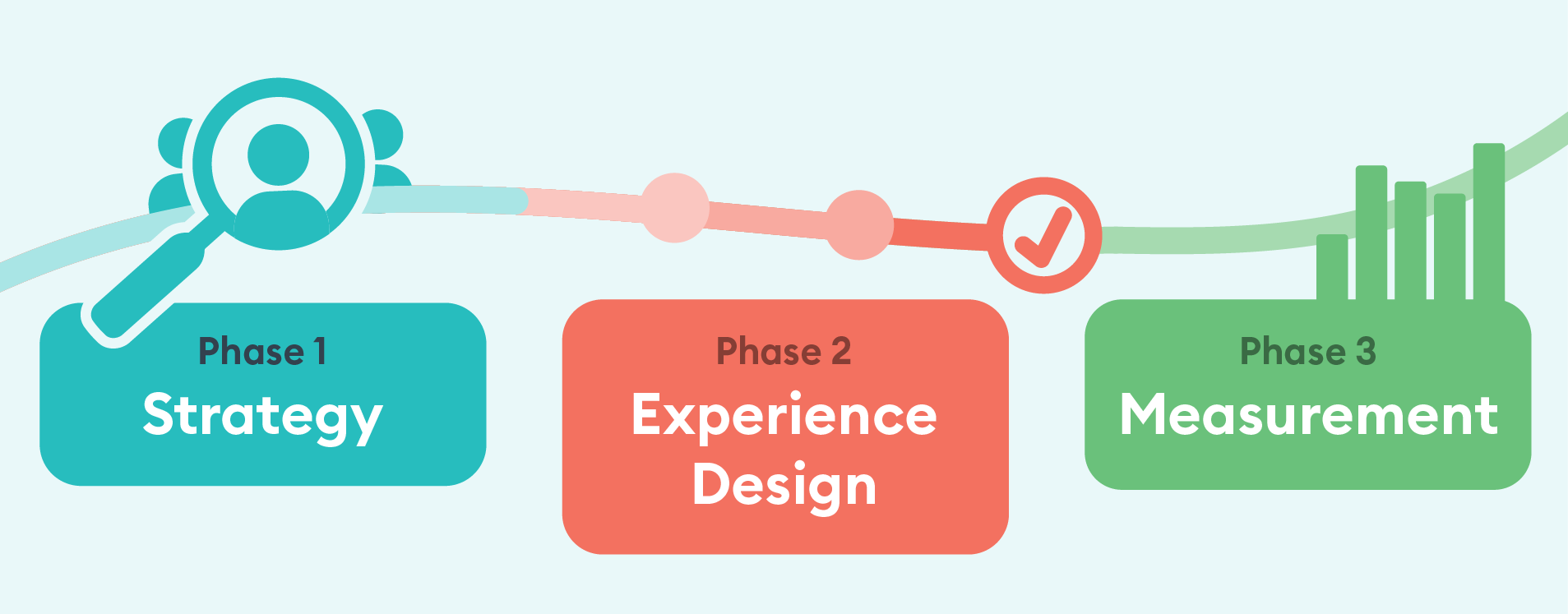
Building an effective association membership website requires three distinct phases: Strategy, Experience Design, and Measurement. Here's how each phase works.
Phase 1: Start with Strategy (The Idea)
Before you build anything, you need clarity on three things: who you're building for, why they should join, and what problems you're actually solving.
Who Uses Your Membership Website?
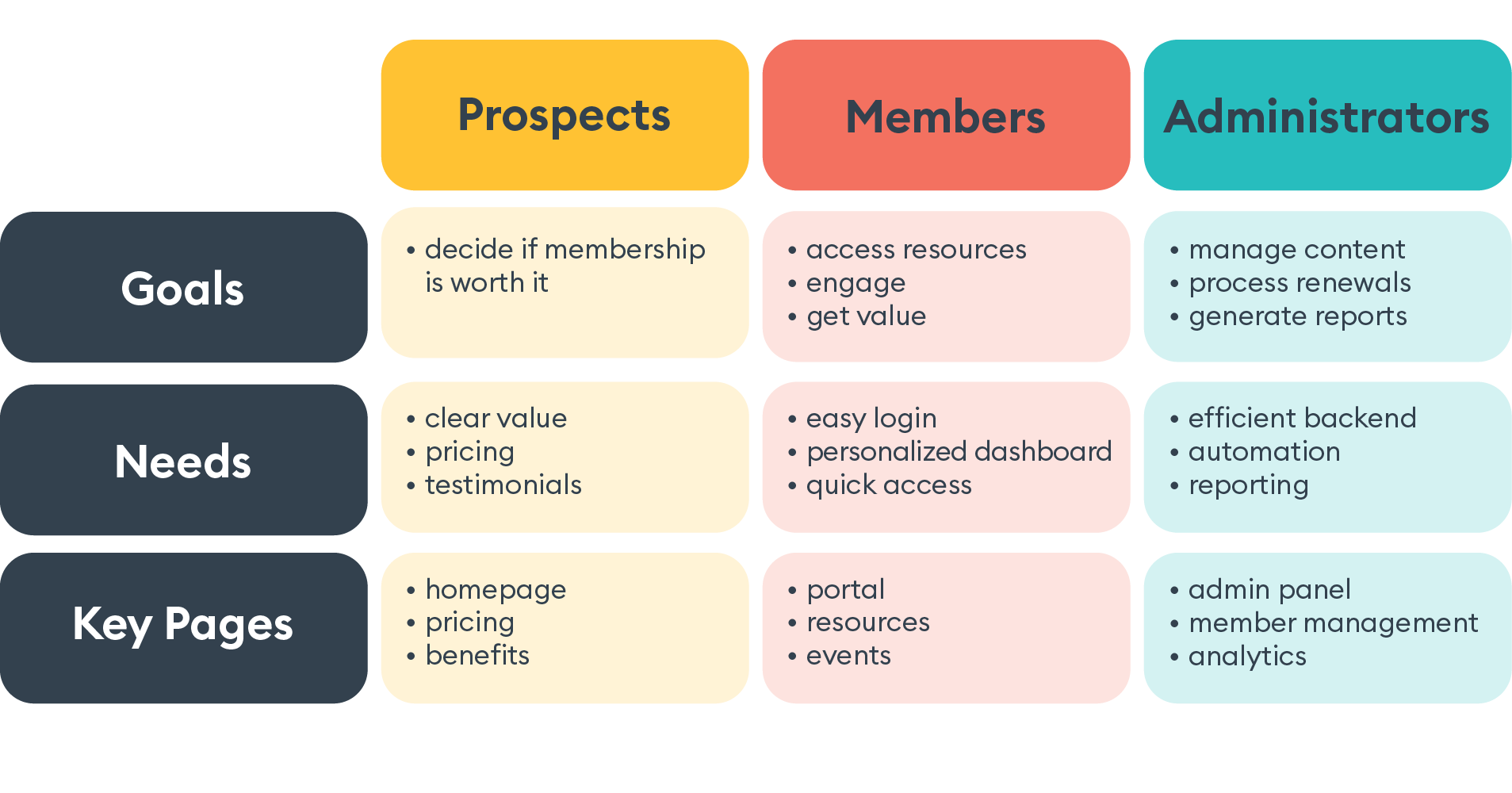
Association membership websites serve three distinct audiences, each with different goals.
- Prospects—These are non-members who are exploring benefits, comparing options, and deciding whether joining makes sense for them.
- Current members— These are your members who need to access exclusive resources, manage their membership details, and engage with your community.
- Administrators — This is your team who manage content, process renewals, generate reports, and keep all your systems running smoothly.
Understanding this matters because most membership sites use the same navigation, content, and calls-to-action for everyone. That often leads to confusion and fewer signups. The best member portals create separate paths or use dynamic content for each audience, so everyone can easily find what they need.
What Should a Membership Website Include?
What's the most important foundation for any membership site?
You need a clear value statement for members. If your board can’t explain why someone should join in one sentence, your website won’t be able to either.
Before you write content or design pages, you need to answer some fundamental questions. What specific problems does membership solve for your target audience? What makes your association different from alternatives or competitors? Can every team member on your staff explain membership value in the same way, or does everyone have a different elevator pitch?
Without this clarity, you're building on shaky ground—no matter how good your design is or how much you invest in the technology.
How to Diagnose What Your Membership Site Actually Needs

How do you know if you need a full redesign or just strategic fixes?
Run a diagnostic audit before you commit to anything (or have an expert do it). Most organizations jump into expensive redesigns before identifying what's actually broken.
Start with a conversion audit. Look at where visitors are dropping off in your signup process. Is your value proposition genuinely clear on every page, or are you assuming people understand what you offer? Are there technical barriers like slow load times, broken forms, or a terrible mobile experience that's killing conversions before people even get to your content?
Next, run an engagement audit focused on your current members. Can they find what they need quickly, or are resources buried in a confusing navigation that mirrors your org chart rather than their needs? Do members even know about benefits they're not using, or are you hiding value in plain sight?
Finally, don't forget the administrative audit. Are your staff members spending hours on manual tasks that should be automated? Can they generate the reports they actually need, or are they exporting data and rebuilding it in spreadsheets every month? Is the backend interface intuitive, or does it require a training session every time someone new joins your team?
This diagnostic approach saves time and budget and ensures you're solving real problems rather than making cosmetic changes that won't move the needle.
Phase 2: Build the Experience (Content Plan & Design)
.jpg?width=7008&height=4672&name=AdobeStock_1641461829%20(2).jpg)
Great membership site design creates distinct experiences for prospects (who need to be convinced), members (who need to be served), and administrators (who need efficiency).
How to Structure Gated vs Ungated Content
What content should be public versus members-only?
Your public content should prove value. Your gated content should deliver on that promise.
Think of your public content as your storefront window. It needs to include a clear explanation of membership benefits and pricing, success stories and testimonials from current members, and high-value sample resources that demonstrate your expertise. Show upcoming events and community highlights that make people want to be part of what you're building. And of course, make it easy to find signup and contact options—don't make prospects hunt for how to give you money.
Your members-only areas should deliver on everything you promised in that public content. This is where you provide exclusive tools, templates, and resources they can't get anywhere else. Include a member directory and networking features, event registration and recordings, educational content and certification programs, and a personalized dashboard that shows their activity and recommends relevant content they haven't discovered yet.
The balance here is crucial: use public content to convert prospects, but don't give away so much that there's no reason to join. Use gated content to retain and engage members, but don't hide everything behind a login or you'll kill conversions before they start.
For Prospects: How to Convert Non-Members into Members
What's the biggest barrier to membership conversions?
Unclear value and complicated signup processes are the biggest barriers
Articulate your value proposition clearly:
It's important to ensure that your value proposition is clear. You should address the question "Why join?" on every page of yodiaur website. Highlight concrete member outcomes and share real success stories from individuals who resemble your target prospects. Make your calls to action visible without being overly aggressive, and place signup opportunities at natural decision points in your content—right after you've made a compelling case for joining.
Smooth sign-up process:
Keep forms short—ask only for essential information upfront and collect details later. Show clear next steps after signup (confirmation email, login instructions) and use progress indicators on multi-step forms to reduce abandonment. If offering multiple membership tiers, clearly differentiate benefits, and test your entire process with someone unfamiliar with your organization. Small A/B tests on button colors, field order, and copy can significantly boost conversion rates.
How to Improve Member Engagement on a Website
Once someone joins, how do you keep them engaged and reduce churn?
Make it easy for members to realize the value of their membership and consistently remind them of it. Ensure that search functions are intuitive, event registration is quick (taking no longer than 30 seconds), and downloads are accessible with one click.
To re-engage inactive members, use behavioral triggers. If a member hasn’t logged in for 60 days, send personalized re-engagement messages tailored to their interests, role, or membership tier.
Begin renewal campaigns 90 days before membership expiration with a "Year in Review" email that highlights the specific value members have received, such as events attended, resources downloaded, and connections made.
How to Design a Member Portal for an Association
Integrate your tech stack (CRM or AMS) with your website to reduce manual tasks and give members control over their accounts.
Your admins manage renewals, events, education, sales, and content—all through your website. If the backend is complicated, features go unused.
What makes a member portal effective for administrators?
The admin interface should use a "what you see is what you get" design. Remove features and code your team doesn’t use, since extra options only add confusion. Train your team on the basics, but also make sure the system is easy enough to use that new staff can learn it quickly.
Reporting capabilities can make or break your admin experience. Your admins need data to make decisions and report to leadership, so make sure you can generate reports in formats they can actually use. Automate routine reports like monthly membership statistics, event registrations, and renewal rates broken down by segment.
A key best practice for association websites is to keep your admins happy with the backend. If they get frustrated, they’ll stop updating content, leading to stale information and lower member engagement.
Phase 3: Launch and Measure (Impact)
Your membership site is never "done." Continuous measurement and optimization separate growing associations from stagnant ones.
What Metrics Should You Track for a Membership Website?
How do you know if your membership site is working?
Track metrics that directly connect to your goals: conversion, engagement, and retention.
For conversion, which means turning prospects into members, start by tracking your visitor-to-member conversion rate.
Track where people abandon your signup form to see where they drop off. Notice which traffic sources bring in the most members, such as search, referrals, or email, so you know where to focus your marketing.
For engagement with active members, track login frequency and monthly active users as your north star metric. Monitor resource downloads and page views per member to understand what content resonates. Watch event registration and attendance rates because those typically correlate strongly with renewal likelihood.
Measure community participation through forum posts, comments, and member directory usage. And don't forget to collect member satisfaction scores through post-login surveys—perception matters as much as behaviour.
For retention and renewals, track renewal rates by membership tier and how long members have been with you, since different groups act differently. Measure the time between sending renewal reminders and when members actually renew.
How to Optimize Your Membership Site Over Time
How often should you update and improve your membership website?
You should update your membership website continuously, using data to guide your changes. Here’s a practical way to do it:
Every month, review your key metrics around conversions, engagement, and renewals to spot trends early. Identify your worst-performing pages or processes and add them to your optimization queue. Survey new members about their signup experience while it's still fresh in their minds—they'll tell you exactly where the friction points are.
Quarterly, run A/B tests on critical conversion points like signup forms, pricing pages, and calls-to-action. Interview low-engagement members to understand what barriers are keeping them from getting value. Update content based on member feedback and usage data rather than gut instinct. Audit your site speed and technical performance because even a one-second delay in load time can significantly impact conversions.
Each year, check if your value proposition still fits the current market. Review admin workflows and improve backend processes that have become outdated.
A helpful tip for building a growing membership site is to use heatmaps and session recordings to see how real users move through your site. This will help you find problem areas you might miss because you’re too familiar with the project.
Final Thoughts: Building a Membership Site That Delivers Results
A good membership website does more than just share information. It encourages action, increases engagement, and leads to real growth. By starting with a strategy that focuses on your audience and value, designing unique experiences for prospects and members, and always measuring what works, you build a digital resource your community truly depends on.
Moving from idea to impact is not about being perfect on launch day. It’s about making thoughtful choices at every step, testing your ideas with real users, and improving based on real feedback and data instead of opinions or office politics.
Ready to diagnose what's holding your association membership website back?
Join our free webinar to learn the framework we use with our clients to build membership sites that actually grow.

Related posts